clientst0rOpen-source IT documentation and a self-hosted service desk
IT documentation and a service desk that share one database.
Install guide Source on GitHub All documentation Share this page
MIT licensed Free to use Self-hosted Latest release v3.17.558, 15 Sep 2026
Is clientst0r right for you?
- The job it does
- Client documentation, assets, credentials and tickets in one place, so a ticket opens with the contract, the asset, the runbook and the credentials the job needs already attached.
- Who should use it
- MSPs who want documentation and ticketing together in a database they own, whether that replaces a per-technician product or fills a gap they have been working around.
- What it needs
- A Linux server or VM — Ubuntu, Debian or Docker — with 2–4 GB of RAM and 10 GB of disk, and a reverse proxy with a certificate in front. Full requirements
- A useful first task
- Create an organization for one client under Admin → Organizations, add one asset to it — a server or a firewall — then open the asset and choose Generate Profile, which writes a linked document for it.
- What it does not replace
-
- An RMM or monitoring agent. It has no agent and no remote control of its own; it pulls devices and alerts from Atera, ConnectWise Automate, Datto, NinjaOne and Tactical RMM instead.
- Your existing PSA, if you keep one — it integrates with ConnectWise, Autotask, Halo and others, and its own service desk stays off until you switch it on.
- What running it costs
- The software is free under the MIT licence. Running it takes: One Linux server or VM with 2–4 GB of RAM, a certificate and a reverse proxy, backups of the database and APP_MASTER_KEY, and someone to apply updates. It holds client credentials, so treat it like any other system that does.
- Install, updates, issues, source
What it does
- A ticket carries the client's active contract, SLA countdown, the linked asset, the runbook and the vault entries the technician needs — secrets listed, never rendered into the page.
- Credential vault encrypted with AES-GCM at rest, per-entry access rules, approval and break-glass flows, and an audit record for every reveal.
- One organization per client, with parent/child relationships, multi-site clients and role-based membership deciding who sees what.
Also in the project
- Queues, SLA timers with pause logic, time entries and dispatch scheduling
- Quotes, invoices, contracts, projects, approvals and workflow rules
- Assets, locations, racks, IPAM, network documentation and knowledge base
- TOTP 2FA required by default, optional Entra ID SSO and LDAP
- Importers for IT Glue and Hudu (over their APIs), a CSV/XLSX column mapper, and Bitwarden/Vaultwarden JSON into the vault
First deployment
What a first installation of clientst0r needs, from the project’s own documentation, read against the repository on 15 Oct 2026. The install guide in the repository has the commands; this page deliberately does not copy them, so they cannot go stale here.
- Start here if
- An MSP whose client documentation, credentials or tickets are spread across spreadsheets, shared drives or separate tools, and who wants them in one database it controls.
- Installing involves
- One command runs the native installer on Ubuntu or Debian, or `docker compose up` after filling in a .env file. It serves plain HTTP, so TLS in front is your step.
- Suits
- Someone comfortable running a Linux server and putting a reverse proxy with a certificate in front of a web application.
- Runs on
- Native install on Ubuntu 20.04+ or Debian 11+, or Docker Engine 24.0+ with Compose v2. The native installer needs Python 3.11, 3.12 or 3.13 from apt and stops without one, which stock Ubuntu 20.04 does not ship, so a current Ubuntu LTS or Debian 12 is the easier start. The published Docker image is linux/amd64; ARM hosts build it locally.
- Resources
- Native: 2 GB RAM minimum, 4 GB recommended, 10 GB free disk. Docker: about 2 GB for the image and 1 GB for the database before any data. No CPU figure is documented.
- Needs
- Internet access during installation. The native installer puts Python, MariaDB and Gunicorn in place and serves plain HTTP on port 8000; Docker also listens on 8000, with an optional Nginx profile for 80/443 using your own certificate. Put TLS in front before exposing it.
- First task to try
- Create an organization for one client under Admin → Organizations, add one asset to it — a server or a firewall — then open the asset and choose Generate Profile, which writes a linked document for it.
Install guide
Keeping it updated
Native: git pull in the install directory, then run install.sh again and choose option 1, which migrates, collects static files and restarts. Docker: git pull, docker compose pull, docker compose up -d; migrations run at start-up and the in-app updater does not work in a container.
Know before you deploy
- The native installer creates an admin account with a default password (INSTALL.md describes a prompt instead, so read what the installer prints). Change it at first sign-in and enrol 2FA.
- Keep a copy of APP_MASTER_KEY somewhere safe: vault entries cannot be decrypted without it.
- Before real data goes in, set DEBUG=False and ALLOWED_HOSTS as INSTALL.md describes, and put TLS in front: the application itself serves plain HTTP.
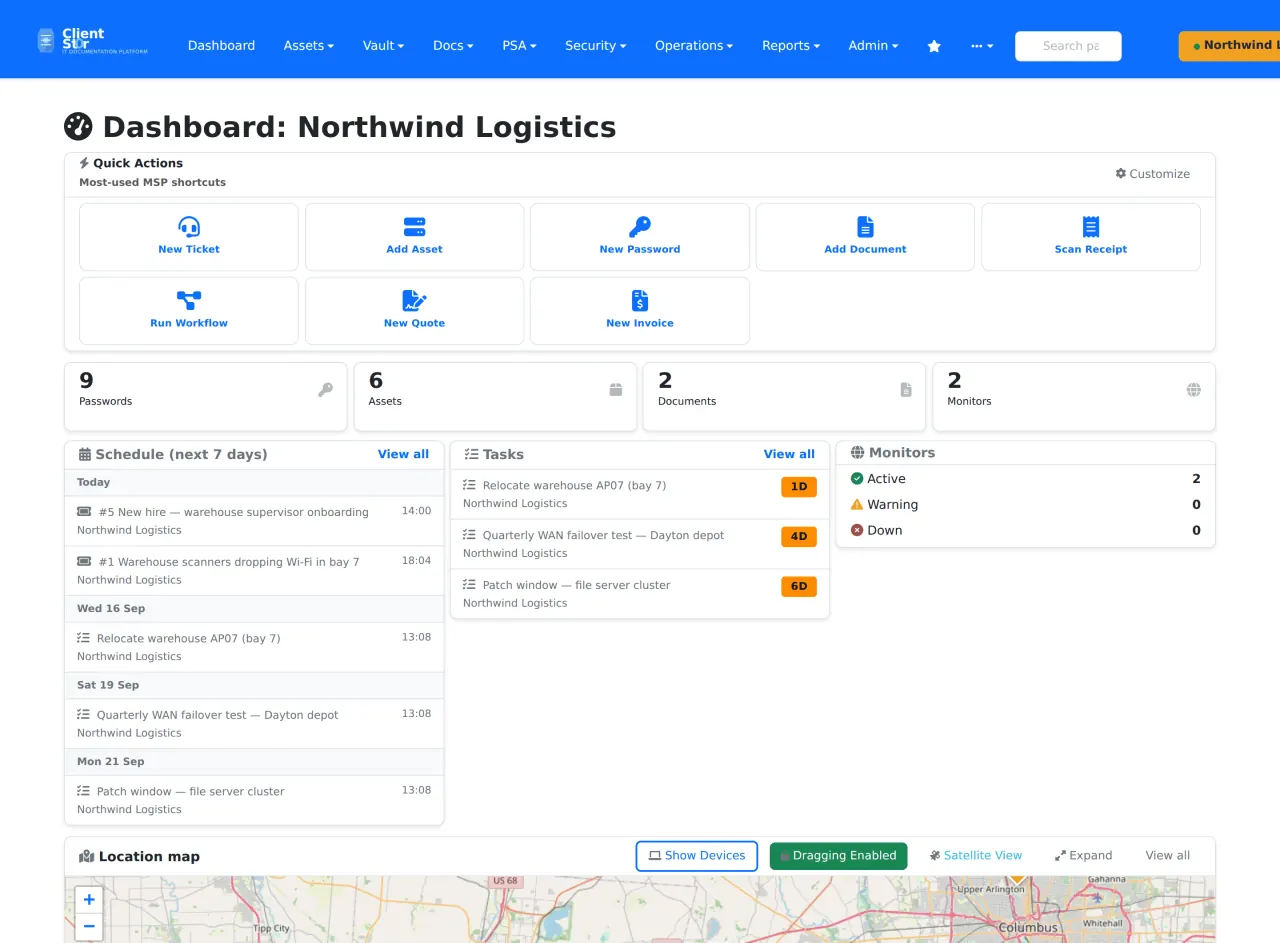
The real interface
Taken from the project’s own repository, which runs on invented demonstration data — no real customer, address or credential is on screen. Select any screenshot to open it at full size.
What it does not do, and where to read more
What it does not do
Limitations the project states about itself.
- Single-server by design: there is no clustered or multi-node deployment.
- The IT Glue and Hudu importers bring organizations, assets, passwords and documents; contacts, locations and networks are not implemented in them yet.
- The service desk is opt-in — `psa_enabled` is off until an administrator turns it on.
- AI-assisted features are optional and do nothing until you supply an API key or a local Ollama address.
Project information
- Latest release
- v3.17.558, published 15 Sep 2026
- Last change
- Committed 21 Oct 2026 Newest tag v3.17.626 has no release page yet.
- Release history
- Changelog
- Installation
- Installation guide
- Updating
- How to update it
- Licence
- MIT (licence file) Built on Django (BSD-3-Clause) and MariaDB (GPL-2.0), both of which you install and run yourself. Nothing in the stack charges per technician or per client.
Read from the GitHub API on 3 Nov 2026, 05:17 UTC. Requirements and first-deployment facts were read against the repository on 15 Oct 2026.
Free and open source. Here is how to help.
clientst0r is MIT licensed and stays free. A bug report, an idea, a test or a share is worth more than money.
-
Report a bug
Version, what you expected, what happened. No client data or credentials.
Open an issue -
Suggest a feature
Vote with a 👍 on GitHub, or tell us privately.
Suggest a feature -
Star or contribute
Star the repository, send a pull request, or improve the documentation.
View repository Contributing guide -
Beta test
Run new versions in a lab and tell us what broke.
Volunteer
Share this page All the ways to help clientst0r and MSP Zero