Depl0yOpen-source Proxmox infrastructure management
Every Proxmox cluster, and the hardware underneath it, on one page.
Install guide Source on GitHub All documentation Share this page
MIT licensed Free to use Self-hosted Latest release v2.2.107, 16 Oct 2026
Is Depl0y right for you?
- The job it does
- A panel that sits next to the Proxmox web interface rather than replacing it: all your clusters and standalone hosts in one view, with Dell iDRAC and HPE iLO health beside the VMs running on that machine.
- Who should use it
- MSPs and IT teams running Proxmox across more than one cluster or site, especially where the servers' iDRAC or iLO management controllers are checked separately.
- What it needs
- Its own Ubuntu or Debian VM (2 vCPU, 2 GB RAM, 20 GB disk) that can reach each Proxmox API, each iDRAC or iLO, and SSH on the nodes. Full requirements
- A useful first task
- Create an API token on one cluster, add it under Proxmox Hosts → + Add Datacenter (Depl0y tests the connection before saving), then compare the dashboard and VM list with what Proxmox shows.
- What it does not replace
-
- The Proxmox web interface. The project calls itself an additional console: cluster creation, storage configuration, Proxmox upgrades and repositories are still done in Proxmox.
- Proxmox Backup Server. Depl0y can browse PBS datastores and trigger backups; PBS still does them.
- Anything, if you run one cluster and never use the BMCs — the project itself says the Proxmox interface is likely all you need then.
- What running it costs
- The software is free under the MIT licence. Running it takes: A small VM of its own (2 vCPU, 2 GB RAM, 20 GB disk for a handful of endpoints), a certificate in front of it, backups of its SQLite database and config.env, and API tokens to look after — they carry broad Proxmox rights.
- Install, updates, issues, source
What it does
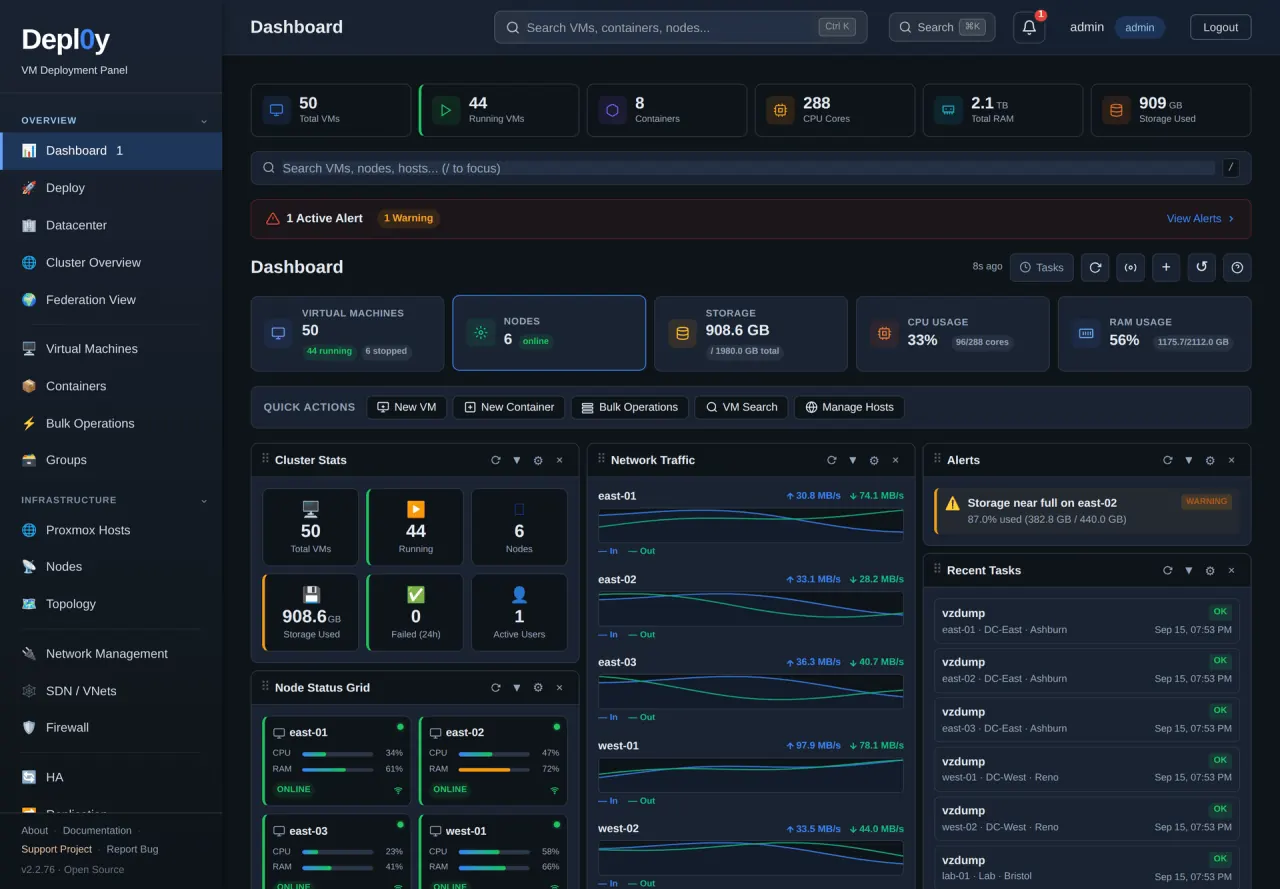
- Each cluster or standalone host is registered as its own endpoint with its own credentials, and the totals, node health and guest inventory for all of them land on one page.
- Dell iDRAC and HPE iLO polled over Redfish: health, power draw, temperature, DIMM and drive inventory, firmware versions, plus power on, off, reset and power cycle through the management controller, which still works when the server itself is fully off.
- Its own Admin, Operator and Viewer accounts with TOTP and an audit log, so operators get a login here instead of Proxmox root credentials.
Also in the project
- Guest inventory and lifecycle across every registered site, with a placement-aware create wizard
- Cloud images for Ubuntu, Debian and Rocky with cloud-init for hostname, user, SSH key, static IP and packages
- VM import from OVA, OVF, VMDK, VHD, VHDX, QCOW2 or RAW, or straight from ESXi or vCenter
- A topology view of sites, nodes, guests, storage pools, bridges and server management controllers as one graph
- A failover wizard, and HA rules management for Proxmox VE 9
First deployment
What a first installation of Depl0y needs, from the project’s own documentation, read against the repository on 15 Oct 2026. The install guide in the repository has the commands; this page deliberately does not copy them, so they cannot go stale here.
- Start here if
- MSPs and IT teams running Proxmox VE across more than one cluster or site, especially where the servers have Dell iDRAC or HPE iLO controllers.
- Installing involves
- One installer script on its own Ubuntu or Debian VM, then a Proxmox API token for each cluster you add.
- Suits
- Someone comfortable with a Linux VM and with creating users and API tokens in Proxmox.
- Runs on
- Its own Ubuntu or Debian VM or container — not a Proxmox node. The installer refuses other distributions; the quick start names no specific releases.
- Resources
- 2 vCPU, 2 GB RAM and 20 GB disk, which the quick start says is enough for a handful of endpoints.
- Needs
- Reach to each Proxmox API on 8006, each iDRAC or iLO on 443, and SSH on 22 to nodes for import and terminal features. The installer downloads the release from github.com (checked against signed checksums) plus packages from your distribution, PyPI and npm. Optional: api.github.com for the in-app update check, downloads.dell.com for the Dell firmware check, and browser access to cdn.jsdelivr.net and OpenStreetMap for the console and map. The panel serves plain HTTP on port 80; TLS is yours to add.
- First task to try
- Create an API token on one cluster, add it under Proxmox Hosts → + Add Datacenter (Depl0y tests the connection before saving), then compare the dashboard and VM list with what Proxmox shows.
Install guide
Keeping it updated
In the panel: Settings → System Updates → Check for updates → Install, which reads the latest GitHub release. Re-running install.sh does the same and keeps the encryption key. Installs made with an installer older than 2.2.90 may need the current install.sh once.
Know before you deploy
- A least-privilege Proxmox role has not been validated. Depl0y is exercised with a token whose privilege separation is disabled, so it carries the owner's full rights. The quick start's suggestion for limiting that: a dedicated Proxmox user with only the privileges your team uses, accepting that some views will return errors. Try it on a lab or test cluster first.
- The first sign-in is admin / admin. Change the password immediately and enable TOTP.
- Back up /etc/depl0y/config.env with the database: stored credentials cannot be decrypted without it.
The real interface
Taken from the project’s own repository, which runs on invented demonstration data — no real customer, address or credential is on screen. Select any screenshot to open it at full size.
What it does not do, and where to read more
What it does not do
Limitations the project states about itself.
- The firmware version check is Dell-only — HPE firmware is inventoried but not compared.
- State lives in SQLite on a single host: there is no HA for the panel itself, and the console and map views need outbound browser access, so it is not air-gapped.
Project information
- Latest release
- v2.2.107, published 16 Oct 2026
- Last change
- Committed 16 Oct 2026
- Release history
- Changelog
- Installation
- Installation guide
- Updating
- How to update it
- Licence
- MIT (licence file) Proxmox VE is a separate project under AGPL-3.0-or-later and is not redistributed here — Depl0y talks to its API. Not affiliated with Proxmox Server Solutions GmbH, Dell or HPE.
Read from the GitHub API on 3 Nov 2026, 05:17 UTC. Requirements and first-deployment facts were read against the repository on 15 Oct 2026.
Documentation
Free and open source. Here is how to help.
Depl0y is MIT licensed and stays free. A bug report, an idea, a test or a share is worth more than money.
-
Report a bug
Version, what you expected, what happened. No client data or credentials.
Open an issue -
Suggest a feature
Vote with a 👍 on GitHub, or tell us privately.
Suggest a feature -
Star or contribute
Star the repository, send a pull request, or improve the documentation.
View repository Contributing guide -
Beta test
Run new versions in a lab and tell us what broke.
Volunteer