m0nitorFree, self-hosted network and firewall monitoring
Open-source network and firewall monitoring: traffic, countries, blocked traffic and explainable security findings.
Install guide Source on GitHub All documentation Share this page
MIT licensed Free to use Self-hosted Pre-release
Is m0nitor right for you?
- The job it does
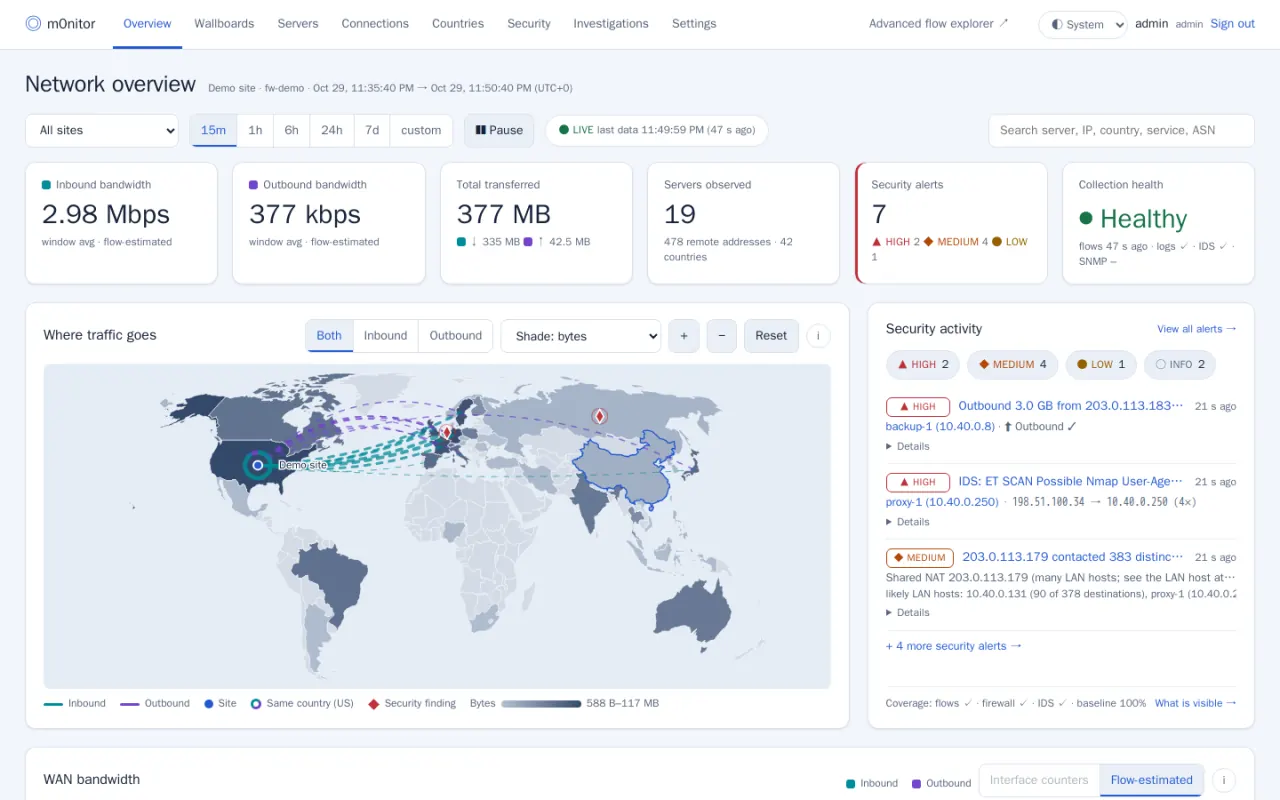
- The firewall sends NetFlow, remote syslog and optionally SNMP; m0nitor turns it into per-server bandwidth, a world map of traffic directions, blocked traffic by country and security findings that each carry their evidence. It never sits in the forwarding path.
- Who should use it
- MSPs and IT teams running OPNsense who want to see their network's traffic and security events on a server they control, and can run a Docker VM next to the firewall.
- What it needs
- A Docker VM (4 vCPU, 8 GB RAM, SSD) and an OPNsense firewall sending NetFlow v9 and remote syslog to it. Full requirements
- A useful first task
- Run the demo with synthetic data to see the pages, then add one firewall in Settings → Firewalls and check the Coverage page shows flows and syslog arriving before trusting any finding.
- What it does not replace
-
- Your firewall. m0nitor only receives telemetry; if it stops, traffic is unaffected.
- A packet capture or TLS inspection tool. It sees flow records and logs, never payloads.
- An uptime or server monitor. It watches traffic and security events, not services and disks.
- What running it costs
- The software is free under the MIT licence. Running it takes: A VM with at least 4 vCPU, 8 GB RAM and an SSD, flow storage that grows with your traffic, and time to keep Docker, Akvorado and ClickHouse updated.
- Install, updates, issues, source
- Optional paid help
- MSP Reboot, a separate company run by the same author, offers paid setup, hosting and support. It is never needed to use m0nitor. Ask about setup help or see what each service covers.
What it does
- Per-server bandwidth and connections with direction, protocol and port filters, plus countries and organisations, a world map of traffic directions and wallboards.
- Security findings from explainable rules — new destination country, unexpected inbound, outbound volume, fan-out and port scans, beaconing, blocked-traffic patterns, IDS alerts, DNS anomalies — each with its evidence, the query, the baseline and next steps.
- Firewall context: logged block decisions by country, the live GeoIP policy, Suricata alerts, and configuration-change and authentication events from syslog.
Also in the project
- Traffic behind a shared outbound NAT address attributed to LAN hosts, with a stated confidence level
- A Coverage page that says which telemetry is actually arriving and what each capability can and cannot see
- Light and dark themes, and a layout that works on a phone
- Optional and off by default: approval-gated blocking through one firewall alias, auto-response with a dry-run mode, and notifications
First deployment
What a first installation of m0nitor needs, from the project’s own documentation, read against the repository on 30 Oct 2026. The install guide in the repository has the commands; this page deliberately does not copy them, so they cannot go stale here.
- Start here if
- An MSP or IT team with OPNsense firewalls that wants traffic and security visibility on its own server.
- Installing involves
- There is no installer script yet. You install Akvorado from its upstream bundle with this repository's overlay, then the app and a Caddy TLS front end with Docker Compose, then point the firewall's NetFlow and syslog at it.
- Suits
- Someone comfortable with Docker Compose, a Linux firewall (ufw) and OPNsense's reporting and logging settings. Rather not? MSP Reboot can set it up as a paid service.
- Runs on
- Ubuntu 24.04 with Docker Engine and the compose plugin, ufw and rsyslog — the reference deployment.
- Resources
- At least 4 vCPU, 8 GB RAM and an SSD. Current ClickHouse needs an x86-64-v3 (AVX2) CPU; the overlay pins an older one otherwise.
- Needs
- OPNsense sending NetFlow v9 (port 2055) and remote syslog (port 5514). SNMP, Suricata and a restricted API user are optional. pfSense works with limits: flows on WAN only, so hosts behind NAT are not visible.
- First task to try
- Run the demo with synthetic data to see the pages, then add one firewall in Settings → Firewalls and check the Coverage page shows flows and syslog arriving before trusting any finding.
Keeping it updated
Pull the repository (or copy a new version), rebuild the app container and re-run the idempotent schema step; Akvorado updates separately by its own documented procedure. Read CHANGELOG.md first.
Know before you deploy
- Pre-release, with no installer script: the install is a sequence of documented manual steps.
- A full restore onto a fresh VM has not been performed yet, by the project's own account; ClickHouse flow data is not in the backup.
The real interface
Taken from the project’s own repository, which runs on invented demonstration data — no real customer, address or credential is on screen. Select any screenshot to open it at full size.
What it does not do, and where to read more
What it does not do
Limitations the project states about itself.
- Pre-release: no published release and no installer script yet.
- Does not decrypt TLS or see payloads, and does not see LAN-to-LAN traffic that never crosses the firewall unless an optional Zeek sensor is added.
- Coverage is not guaranteed: absent telemetry is shown as absent, not as safe.
Project information
- Latest release
- Pre-release No published release yet: install from the main branch, following docs/install.md.
- Last change
- Committed 30 Oct 2026
- Release history
- Changelog
- Installation
- Installation guide
- Updating
- How to update it
- Licence
- MIT (licence file) Bundled third-party files keep their own licences (see NOTICE); the Akvorado configuration under akvorado/config stays AGPL-3.0. Flow storage is Akvorado, a separate open-source project.
Read from the GitHub API on 30 Oct 2026, 20:32 UTC. Requirements and first-deployment facts were read against the repository on 30 Oct 2026.
Rather not run it yourself?
MSP Reboot offers paid setup, hosting and support. You don’t need a finished plan: tell us what you’re trying to run, and we’ll help work out whether self-hosting makes sense or what we’d take on. Asking doesn’t commit you to anything.
Every project is free and open source under the MIT licence either way. Setup, hosting and support are optional paid services, never a condition of using it.