OPNMGROpen-source OPNsense fleet management
Watch, back up and update every OPNsense firewall you look after.
Install guide Source on GitHub All documentation Share this page
MIT licensed Free to use Self-hosted Latest release v3.67.0, 17 Sep 2026
Is OPNMGR right for you?
- The job it does
- One place for the whole OPNsense fleet, grouped by customer and site — health telemetry that becomes incidents, configuration backups compared against a baseline you approved, and updates rolled out in rings.
- Who should use it
- Anyone supporting OPNsense across more than a handful of customers, who currently finds out a tunnel is down because somebody rings up.
- What it needs
- An Ubuntu 22.04+ server with PHP 8, MySQL or MariaDB and Apache or Nginx, reachable over HTTPS by your firewalls. The project documents no CPU, memory or disk figures. Full requirements
- A useful first task
- Enrol one test firewall you can reach out-of-band: on the manager's Settings page, open the Manager FQDN dialog, copy the agent install command and run it on the firewall as root. Then open that firewall's health view, and check its Backups tab once a configuration backup has run.
- What it does not replace
-
- The OPNsense web interface. Rules and settings are still made on the firewall; OPNMGR backs them up, compares them with a baseline you approved and never restores one automatically.
- A customer portal. Customers and sites organise your fleet; they are not logins, and nobody outside your own team signs in.
- Deciso's own services. OPNMGR is independent of, and not endorsed by, the OPNsense project.
- What running it costs
- The software is free under the MIT licence. Running it takes: One Ubuntu server with PHP, a database and a web server, a hostname and certificate the firewalls reach over HTTPS, backups of its database and the configuration archive, and time to build, sign and promote agent packages as they change.
- Install, updates, issues, source
What it does
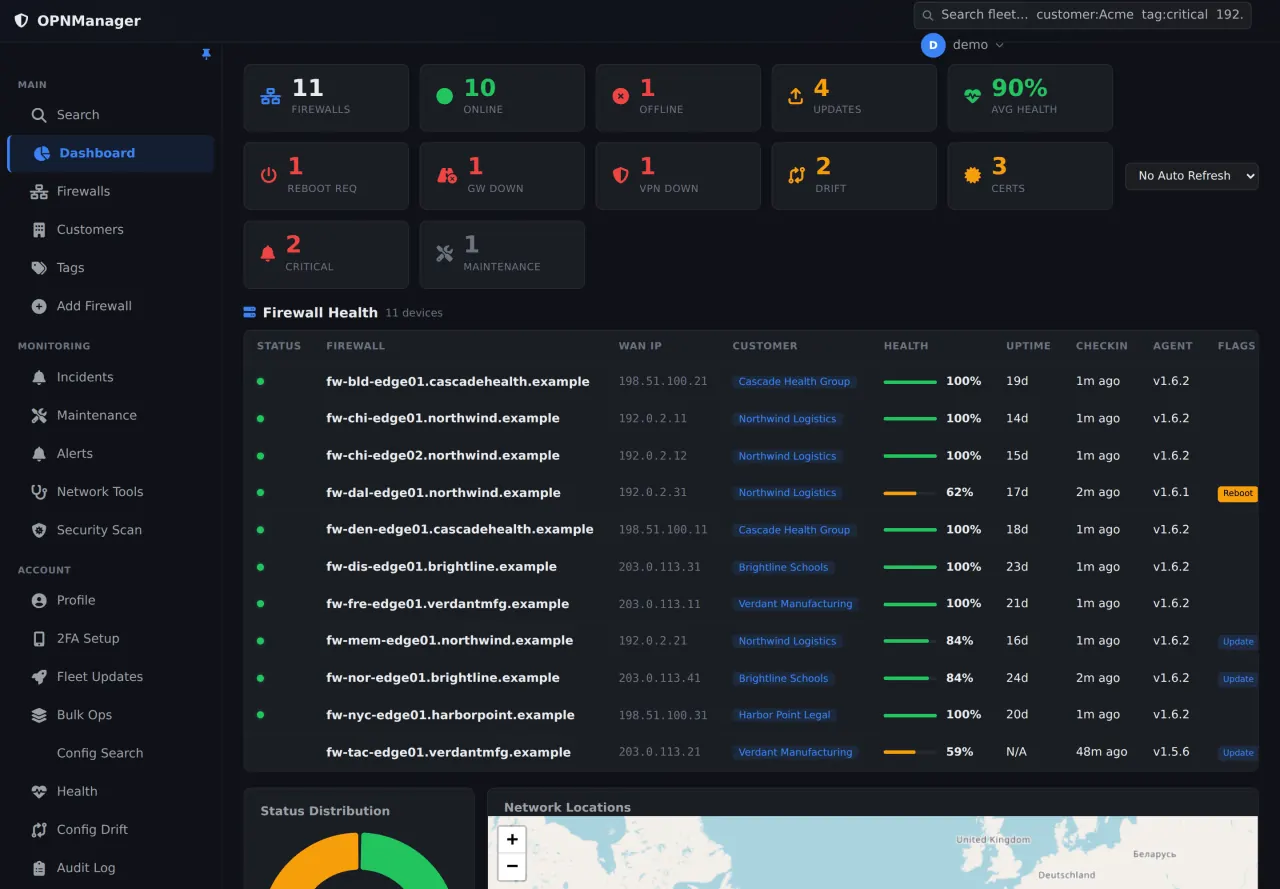
- Agents report check-ins, gateway latency and loss, VPN tunnel state, CARP status, service state and certificate expiry — and a problem becomes one incident that closes when it actually clears, rather than an email per poll.
- Scheduled configuration backups per firewall, compared against the baseline you approved, with the diff named by rule description. Nothing is ever restored automatically.
- Update campaigns through canary, pilot and production rings with manual progression, and never both members of a CARP pair at once.
Also in the project
- Customers group sites, sites group firewalls — each with code, timezone, contacts and a default maintenance window
- Per-firewall WAN throughput, CPU load, memory and disk trends collected on each check-in
- Maintenance windows that withhold notification while health collection continues
- A per-firewall API key; secrets and SSH keys encrypted at rest with XChaCha20-Poly1305
First deployment
What a first installation of OPNMGR needs, from the project’s own documentation, read against the repository on 15 Oct 2026. The install guide in the repository has the commands; this page deliberately does not copy them, so they cannot go stale here.
- Start here if
- An MSP or IT team looking after OPNsense firewalls across several customers or sites, comfortable installing a PHP application by hand.
- Installing involves
- A manual install: clone the repository, run Composer, load the database schema, fill in .env and configure the web server — then build and host the agent package before enrolling a firewall.
- Suits
- Someone comfortable setting up a PHP application, its database and its web server by hand, and running a command on OPNsense as root.
- Runs on
- Manager: Ubuntu 22.04 LTS or newer. Firewalls: validated on OPNsense 26.7 (FreeBSD 14); earlier releases are untested rather than known broken.
- Resources
- Not documented by the project.
- Needs
- PHP 8.0+ (CI builds against 8.3) with Composer, MySQL 8.0+ or MariaDB 10.6+, and Apache 2.4+ or Nginx 1.18+. A hostname the firewalls reach over HTTPS: firewalls need outbound HTTPS to the manager and no inbound port.
- First task to try
- Enrol one test firewall you can reach out-of-band: on the manager's Settings page, open the Manager FQDN dialog, copy the agent install command and run it on the firewall as root. Then open that firewall's health view, and check its Backups tab once a configuration backup has run.
Install guide
Keeping it updated
docs/UPGRADING.md: git pull, php scripts/migrate.php, then the update wrapper's sync — or the in-app System Update page, which takes a database backup first. Firewall agents are updated from each firewall's page, and a newly built agent version is held until you promote it.
Know before you deploy
- Build the agent package first. A fresh clone has no agent package to serve, so enrolment gets a 404 until you build it from plugin/os-opnmanager-agent/ and place the tarball in downloads/plugins/ on your manager. The repository's scripts/build_agent_package.sh writes it there and prints the signing and rollout steps that follow.
- Use the install command from the Settings page's Manager FQDN dialog. It sets OPNMGR_BASE_URL, which the agent installer requires; the shorter command in the README omits it, and the older command on the Add Firewall page is not the current one.
- Schedule the cron jobs yourself. Configuration backups depend on cron/nightly_backups.php and incidents on cron/evaluate_alerts.php every five minutes; the Quick Start does not list them (FEATURES.md and docs/UPGRADING.md do).
- Write the web server configuration yourself and put TLS on it: the repository ships an nginx hardening snippet but no ready-made site file, and the firewalls need HTTPS to the manager. The first administrator is created with scripts/create_admin.php; there is no default login.
The real interface
Taken from the project’s own repository, which runs on invented demonstration data — no real customer, address or credential is on screen. Select any screenshot to open it at full size.
What it does not do, and where to read more
What it does not do
Limitations the project states about itself.
- The two firewall lockdown policies have not been exercised against a live firewall by the maintainer; apply to one firewall you can reach out-of-band first.
- No LTS line and no published release cadence — read the changelog before upgrading. The main branch moves ahead of the last tagged GitHub release.
- Agent request signing exists on the server only: no released agent signs its requests, so the authentication mode must stay at compatibility.
- Health telemetry needs agent 1.6.2 or later.
Project information
- Latest release
- v3.67.0, published 17 Sep 2026
- Last change
- Committed 29 Oct 2026
- Release history
- Changelog
- Installation
- Installation guide
- Updating
- How to update it
- Licence
- MIT (licence file) OPNsense itself is a separate project under BSD-2-Clause. OPNMGR is not affiliated with or endorsed by Deciso B.V.
Read from the GitHub API on 3 Nov 2026, 05:17 UTC. Requirements and first-deployment facts were read against the repository on 15 Oct 2026.
Free and open source. Here is how to help.
OPNMGR is MIT licensed and stays free. A bug report, an idea, a test or a share is worth more than money.
-
Report a bug
Version, what you expected, what happened. No client data or credentials.
Open an issue -
Suggest a feature
Vote with a 👍 on GitHub, or tell us privately.
Suggest a feature -
Star or contribute
Star the repository, send a pull request, or improve the documentation.
View repository Documentation -
Beta test
Run new versions in a lab and tell us what broke.
Volunteer