St0rAn open-source administration interface for UrBackup
A management interface for UrBackup Server, which it installs for you if you have none.
Install guide Source on GitHub All documentation Share this page
MIT licensed Free to use Self-hosted Latest release v3.2.122, 21 Oct 2026
Is St0r right for you?
- The job it does
- Endpoint status, schedules and retention, single-file recovery and offsite replication, on top of UrBackup Server — an existing one, or one the installer adds for you. It presents UrBackup; it does not replace the backup engine.
- Who should use it
- Anyone running UrBackup Server who spends too long in its native settings screens, or who cannot easily answer "did that endpoint back up last night?" — and anyone starting from nothing, since the installer sets UrBackup up as well.
- What it needs
- The Ubuntu or Debian machine that runs UrBackup Server 2.5.x: St0r installs on the same host, and can install UrBackup there for you. Full requirements
- A useful first task
- Open Endpoints and check one endpoint's last file and image backup, then open its file browser, pick a day that has a backup and download one test file.
- What it does not replace
-
- UrBackup. It does every backup, owns the storage and decides what is recoverable; stop St0r and the backups carry on.
- A test restore. Replication copies the backup store, deletions and corruption included.
- A view across several UrBackup servers — one server per installation, on the same host.
- What running it costs
- The software is free under the MIT licence. Running it takes: Nothing beyond the UrBackup host you already size for backup storage — but that host now also runs Node.js, MariaDB and Nginx, needs a certificate, and needs its own backup of UrBackup's databases.
- Install, updates, issues, source
What it does
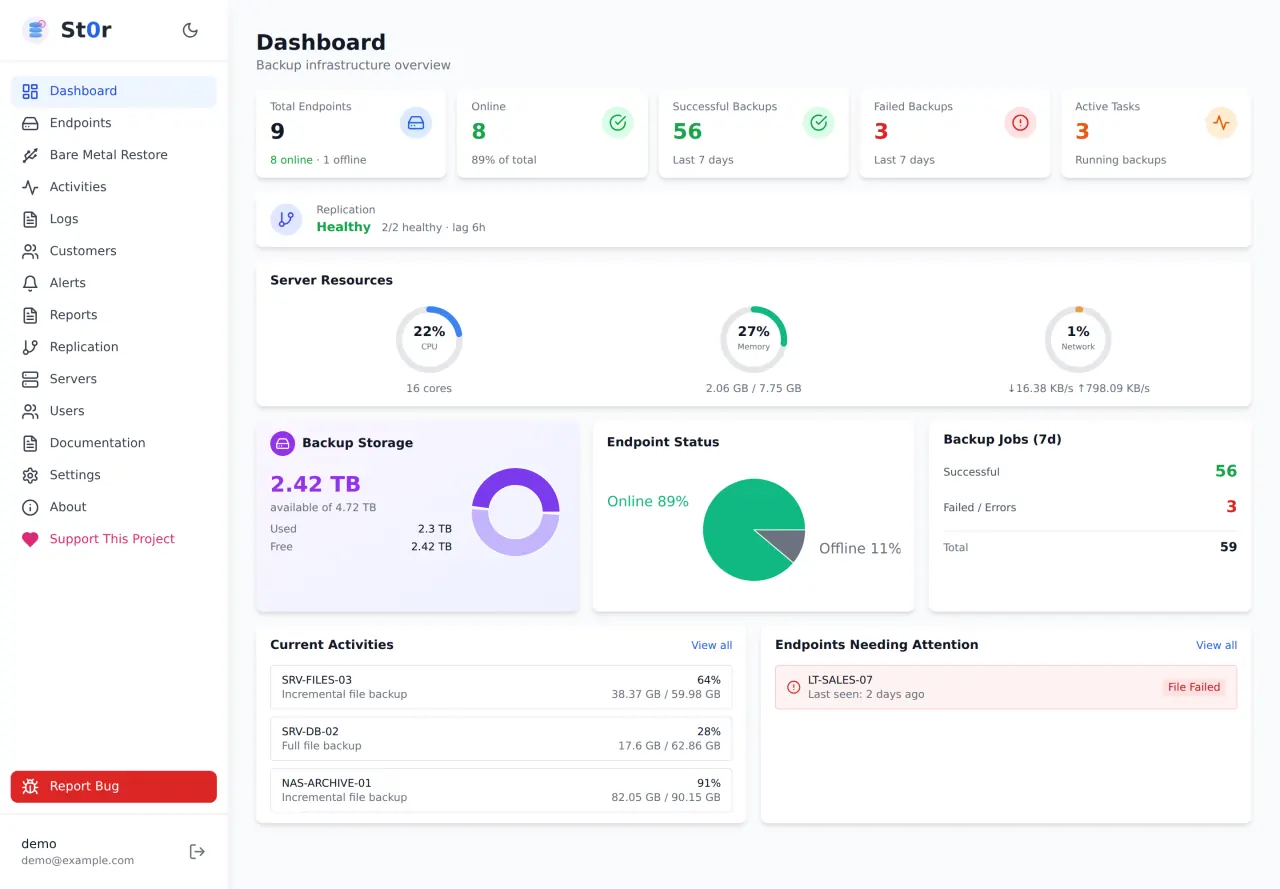
- One table of every endpoint — online state, last file and image backup, storage against an optional quota, and what needs attention — instead of several UrBackup screens.
- Intervals, backup windows, retention counts, excluded paths and per-endpoint quotas in labelled tabs, with UrBackup's own default shown beside each field.
- Offsite replication of the backup store over SSH/rsync to a standby server, with run history, bytes transferred, replication lag and alerting on failure.
Also in the project
- Live progress for running jobs — data transferred, throughput and time remaining
- File recovery: pick a day, open that backup, browse in and download a file or a folder
- Disk guard — warning, critical and emergency thresholds that pause backups before a volume fills
- Its own accounts, customers and replication history in a separate MariaDB database
First deployment
What a first installation of St0r needs, from the project’s own documentation, read against the repository on 21 Oct 2026. The install guide in the repository has the commands; this page deliberately does not copy them, so they cannot go stale here.
- Start here if
- Anyone running UrBackup Server who wants endpoint status and file recovery in one place — or starting from nothing, since the installer can add UrBackup too.
- Installing involves
- One interactive installer on the UrBackup host, which adds Node.js, MariaDB, Nginx — and UrBackup, if it is missing. Run on its own it installs the latest published release; run from a clone, it installs that checkout. HTTPS is a separate certbot step.
- Suits
- Someone comfortable administering the Linux machine that runs UrBackup, including its Nginx.
- Runs on
- Ubuntu or Debian (the installer is apt-based); no specific releases are documented. It must run on the same host as UrBackup Server 2.5.x, developed and verified against 2.5.38; other versions are untested rather than known broken. When it installs UrBackup for you it takes the PPA's version on Ubuntu and the latest release on Debian, so check which one you got.
- Resources
- Not documented for St0r itself. Size the host for UrBackup's backup storage.
- Needs
- Internet access during installation for Node.js, MariaDB, Nginx and — if absent — UrBackup, from the uroni PPA on Ubuntu or the official .deb on Debian. The web interface is on port 80; UrBackup itself uses 55413–55415.
- First task to try
- Open Endpoints and check one endpoint's last file and image backup, then open its file browser, pick a day that has a backup and download one test file.
Install guide
Keeping it updated
In the interface: About → Check for Updates → Update Now, which backs up the installation, applies the release and restores the backup if the service does not come back. From a checkout: git pull, then sudo ./deploy.sh. Upgrading to 3.2.120 signs everyone out once, and an agent on another server stops answering until it is installed again (Install agent over SSH, or a new install command); it keeps its API key.
Know before you deploy
- Read install.sh before you run it as root: the installation guide shows downloading it with wget and reading it first. It prints the version it is about to install, and ST0R_INSTALL_VERSION pins a particular release.
- The installer takes over Nginx's default site: it removes sites-enabled/default and listens as the default server on port 80. Do not install it on a machine already serving web content — the installation guide covers running it behind an existing web server instead.
- It serves plain HTTP until you add TLS. The installation guide's "Enabling HTTPS" section uses certbot with the bundled Nginx site. Do not expose it over plain HTTP to an untrusted network.
- The first run generates an admin password, prints it and writes it to /opt/urbackup-gui/initial-admin-password.txt. Change it at first sign-in and delete the file.
- St0r writes to UrBackup's own databases, so keep a backup of /var/urbackup of your own. Once HTTPS is on, set COOKIE_SECURE=true in its .env.
The real interface
Taken from the project’s own repository, which runs on invented demonstration data — no real customer, address or credential is on screen. Select any screenshot to open it at full size.
What it does not do, and where to read more
What it does not do
Limitations the project states about itself.
- One UrBackup server per installation, on the same host. There is no view across several servers.
- Replication is a push copy, not an independent verified restore — deletions and corruption replicate too, so test restores still matter.
Project information
- Latest release
- v3.2.122, published 21 Oct 2026
- Last change
- Committed 21 Oct 2026
- Release history
- Changelog
- Installation
- Installation guide
- Updating
- How to update it
- Licence
- MIT (licence file) St0r runs on top of UrBackup Server, which is a separate project under AGPL-3.0 and stays that way whether you installed it or St0r's installer did. St0r is a management interface over it, not a fork of it.
Read from the GitHub API on 3 Nov 2026, 05:17 UTC. Requirements and first-deployment facts were read against the repository on 21 Oct 2026.
Free and open source. Here is how to help.
St0r is MIT licensed and stays free. A bug report, an idea, a test or a share is worth more than money.
-
Report a bug
Version, what you expected, what happened. No client data or credentials.
Open an issue -
Suggest a feature
Vote with a 👍 on GitHub, or tell us privately.
Suggest a feature -
Star or contribute
Star the repository, send a pull request, or improve the documentation.
View repository Documentation -
Beta test
Run new versions in a lab and tell us what broke.
Volunteer