rem0teSelf-hosted RustDesk management for MSPs
A customer-facing portal around a self-hosted RustDesk server.
Install guide Source on GitHub All documentation Share this page
MIT licensed Free to use Self-hosted Latest release v0.19.11, 2 Nov 2026
Is rem0te right for you?
- The job it does
- Organise each customer business's computers, decide who may connect to what, enrol managed devices, and keep an audit trail — on the open-source RustDesk server, with no Pro component.
- Who should use it
- MSPs who want remote access running on a server they control, whether that replaces a per-technician or per-endpoint product or adds a tool they do not have yet, and who have somewhere to run a small server with a public IP.
- What it needs
- A public-facing Ubuntu 22.04 or Debian 12 server (1–2 vCPU, 1–2 GB RAM), a domain pointing at it, and the RustDesk ports open. Full requirements
- A useful first task
- Create one business, enrol one test computer with Enroll Computer — choosing the business, who may connect and the platform — then connect as an allowed user and check the connection appears in the audit log.
- What it does not replace
-
- RustDesk. The rendezvous and relay servers and the clients are RustDesk's; technicians still need the RustDesk client installed.
- An RMM. It works alongside one — the repository documents running it next to Tactical RMM.
- Screen recording. Sessions are logged by who, which machine, when and how long; the screen is not recorded.
- What running it costs
- The software is free under the MIT licence. Running it takes: A small public-facing server (1–2 vCPU, 1–2 GB RAM), a domain and DNS record, open RustDesk ports, and prompt updates: it is internet-facing and hands out remote-access credentials.
- Install, updates, issues, source
What it does
- Computers grouped by the customer business that owns them, with platform, online state and last-seen time, instead of a spreadsheet of RustDesk IDs.
- Connect authorises the request and hands the credentials to the RustDesk client on the technician's own PC — nothing typed, emailed or kept in a shared note, and every reveal is written to the audit log.
- Three levels — Platform Admin, Business Owner, Business User — with the business boundary enforced on the server rather than by hiding buttons.
Also in the project
- Device enrolment that binds the business into the installer token, so a machine cannot pick another
- Enrolment scripts for Windows, Linux and macOS, plus a compiled Windows installer
- Quick Connect for a machine you do not manage — no install, no enrolment, ends when they close the client
- Session history — who connected to which machine, when and for how long — and an append-only audit log of sign-ins, sessions and credential reveals. It does not record the screen.
First deployment
What a first installation of rem0te needs, from the project’s own documentation, read against the repository on 15 Oct 2026. The install guide in the repository has the commands; this page deliberately does not copy them, so they cannot go stale here.
- Start here if
- An MSP that wants remote support on a server it controls, with each customer's computers kept separate, and has somewhere to run a small server with a public IP.
- Installing involves
- One installer script, given your domain and an email address, installs everything and sets up HTTPS. You open RustDesk's ports yourself, and computers are added with the enrolment scripts it generates.
- Suits
- Someone comfortable with a public-facing Linux server, DNS records and firewall ports.
- Runs on
- Ubuntu 22.04 LTS (recommended) or Debian 12. Plain systemd; Docker is not required.
- Resources
- Minimum 1 vCPU, 1 GB RAM, 10 GB disk. Recommended 2 vCPU, 2 GB RAM, 20 GB disk.
- Needs
- A public IP, and a domain with a DNS A record for automatic HTTPS (a bare IP works, over plain HTTP). Ports 80 and 443, plus RustDesk's 21115 TCP, 21116 TCP and UDP, 21117 TCP and optionally 21118–21119; the installer does not open them. Node.js 20, PostgreSQL, Redis, Caddy and the RustDesk server are installed for you. Technicians need the RustDesk client.
- First task to try
- Create one business, enrol one test computer with Enroll Computer — choosing the business, who may connect and the platform — then connect as an allowed user and check the connection appears in the audit log.
Install guide
Keeping it updated
rem0te, the RustDesk clients on endpoints and the RustDesk server update separately. The in-app updater is off by default and needs a GPG-signed release tag plus ALLOW_IN_APP_UPDATE=true; otherwise deploy a build by hand as docs/setup.md describes.
Know before you deploy
- The installer prints the admin credentials once and also keeps them in /etc/reboot-remote/api.env (readable by root only). Save them, sign in and change the password.
- Run it as root on a dedicated server: it replaces /etc/caddy/Caddyfile (keeping a .bak), and it does not open the RustDesk ports — the documented ufw commands do.
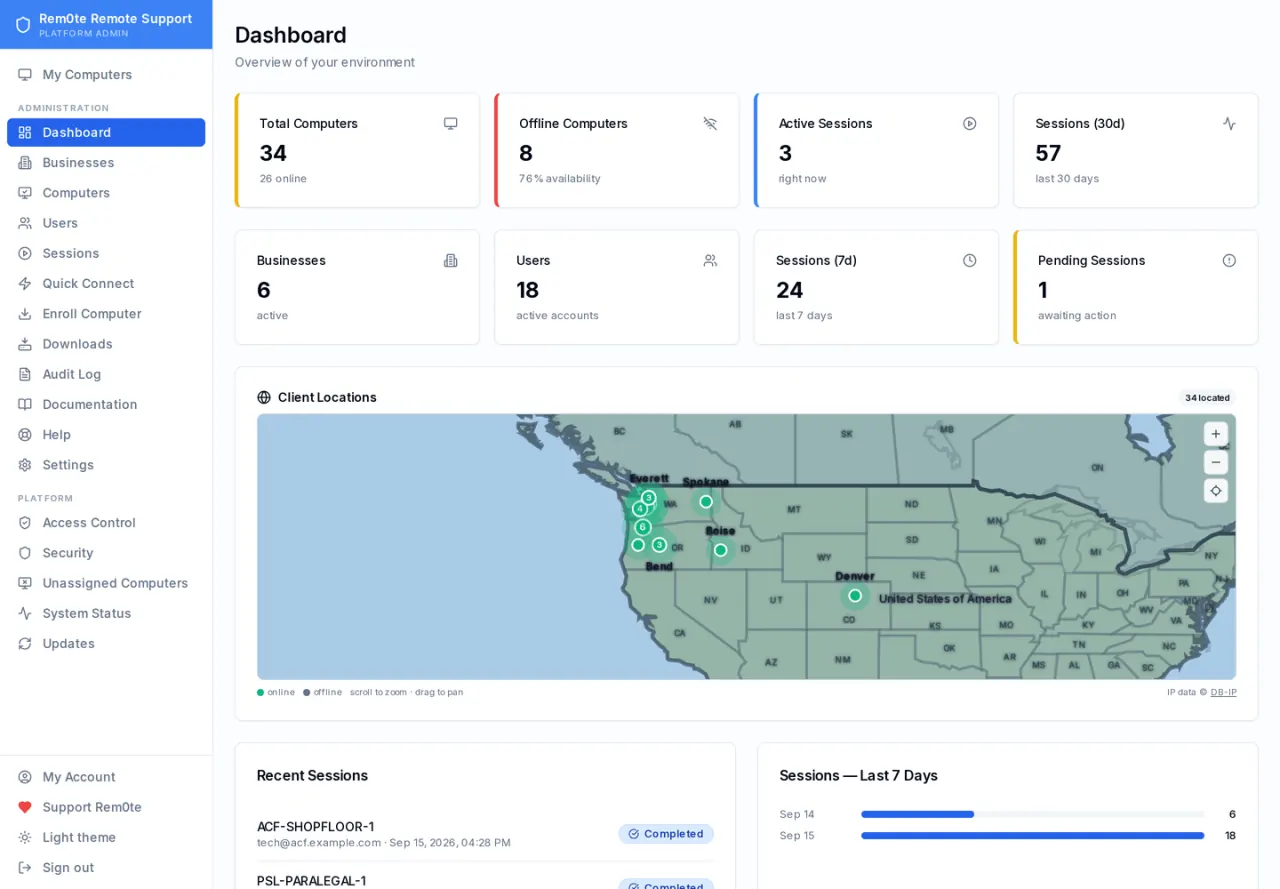
The real interface
Taken from the project’s own repository, which runs on invented demonstration data — no real customer, address or credential is on screen. Select any screenshot to open it at full size.
What it does not do, and where to read more
What it does not do
Limitations the project states about itself.
- Not an RMM: it reports hardware, OS details and pending Windows updates, but it installs, schedules and remediates nothing, and has no ticketing or monitoring.
- No in-browser remote control — Connect opens a rustdesk:// link and a local RustDesk client is required.
- One RustDesk server per instance; the relay host and public key are platform-wide settings, not per-business.
Project information
- Latest release
- v0.19.11, published 2 Nov 2026
- Last change
- Committed 2 Nov 2026
- Release history
- Changelog
- Installation
- Installation guide
- Updating
- How to update it
- Licence
- MIT (licence file) RustDesk is a separate project under AGPL-3.0 — the hbbs/hbbr server and the clients. rem0te is the portal around them and states that no RustDesk Pro component, licence key or subscription is required by the project.
Read from the GitHub API on 3 Nov 2026, 05:17 UTC. Requirements and first-deployment facts were read against the repository on 15 Oct 2026.
Documentation
Free and open source. Here is how to help.
rem0te is MIT licensed and stays free. A bug report, an idea, a test or a share is worth more than money.
-
Report a bug
Version, what you expected, what happened. No client data or credentials.
Open an issue -
Suggest a feature
Vote with a 👍 on GitHub, or tell us privately.
Suggest a feature -
Star or contribute
Star the repository, send a pull request, or improve the documentation.
View repository Documentation -
Beta test
Run new versions in a lab and tell us what broke.
Volunteer